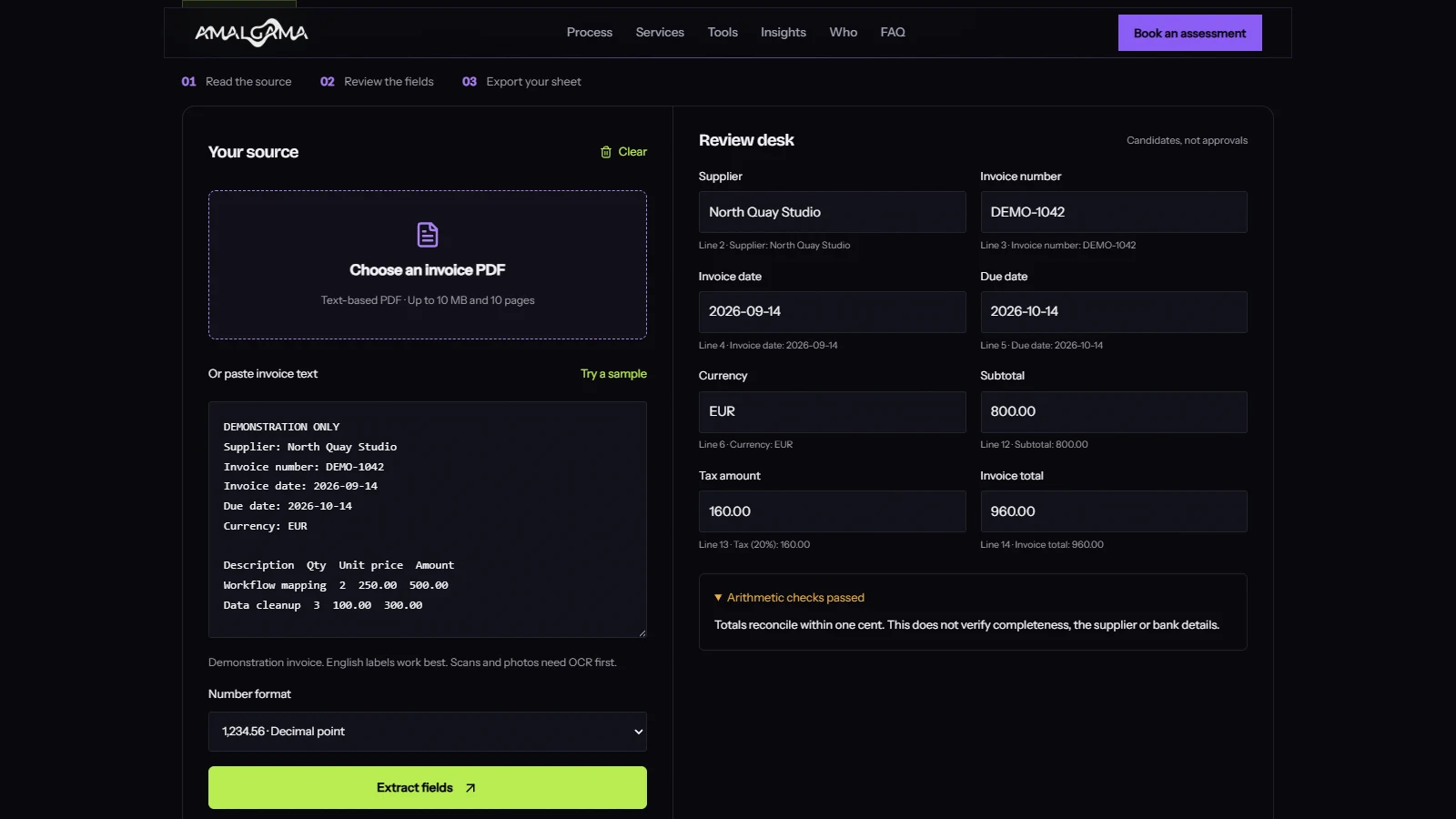
A supplier sends a PDF for EUR 960. Your system extracts EUR 960. The demonstration looks convincing. Then someone asks whether the invoice was already paid, whether the bank account changed, and why the purchase order says EUR 800.
The spreadsheet cannot answer those questions by looking tidy.
Invoice processing automation starts by extracting data, then checking it against the document and the business records that justify payment. You can test the extraction step with our free Invoice to Excel tool. It reads text-based PDFs locally, gives you editable fields and exports an XLSX or CSV file. It does not approve payments.
Get one invoice into a useful sheet
Start with a document you are authorised to process. If the PDF lets you select and copy its words, it has a text layer that a parser can work with. A scanned page is different. It needs optical character recognition before the text can be extracted.
The Amalgama tool accepts one text-based PDF of up to 10 MB and 10 pages, or pasted text. Choose the number format before extracting. 1,234.56 and 1.234,56 represent the same amount under different conventions. A parser that treats them as interchangeable without checking has found an efficient way to create accounting work.
Check the supplier, invoice number, dates, currency and amounts against the source. Dates should be unambiguous. Rewrite 04/05/2026 as a confirmed 2026-05-04 or 2026-04-05, rather than asking the software to choose a country on your behalf.
Missing values stay blank. The tool attaches source lines to candidates so you can see what produced them. Its rules recognise common English labels and a simple line-item layout with description, quantity, unit price and amount. Unfamiliar layouts can require manual entry. This version does not use a generative AI model or read handwriting.
Once you have checked the values and warnings, download the workbook. It includes the source references and the review notes, which makes it more useful than a row of numbers with no history.
Check the arithmetic before admiring the extraction
The demonstration invoice contains two fictional services. It is a test fixture, not a customer invoice or a measured business result.
| Description | Quantity | Unit price | Amount |
|---|---|---|---|
| Workflow mapping | 2 | EUR 250.00 | EUR 500.00 |
| Data cleanup | 3 | EUR 100.00 | EUR 300.00 |
| Subtotal | EUR 800.00 | ||
| Tax at 20%, illustrative only | EUR 160.00 | ||
| Invoice total | EUR 960.00 |
Two checks should pass. The line-item amounts add up to EUR 800, and subtotal plus tax equals EUR 960. Change the total to EUR 980 and the tool should flag the discrepancy. Change the quantity of the second item to four without changing its amount and it should flag that row too.
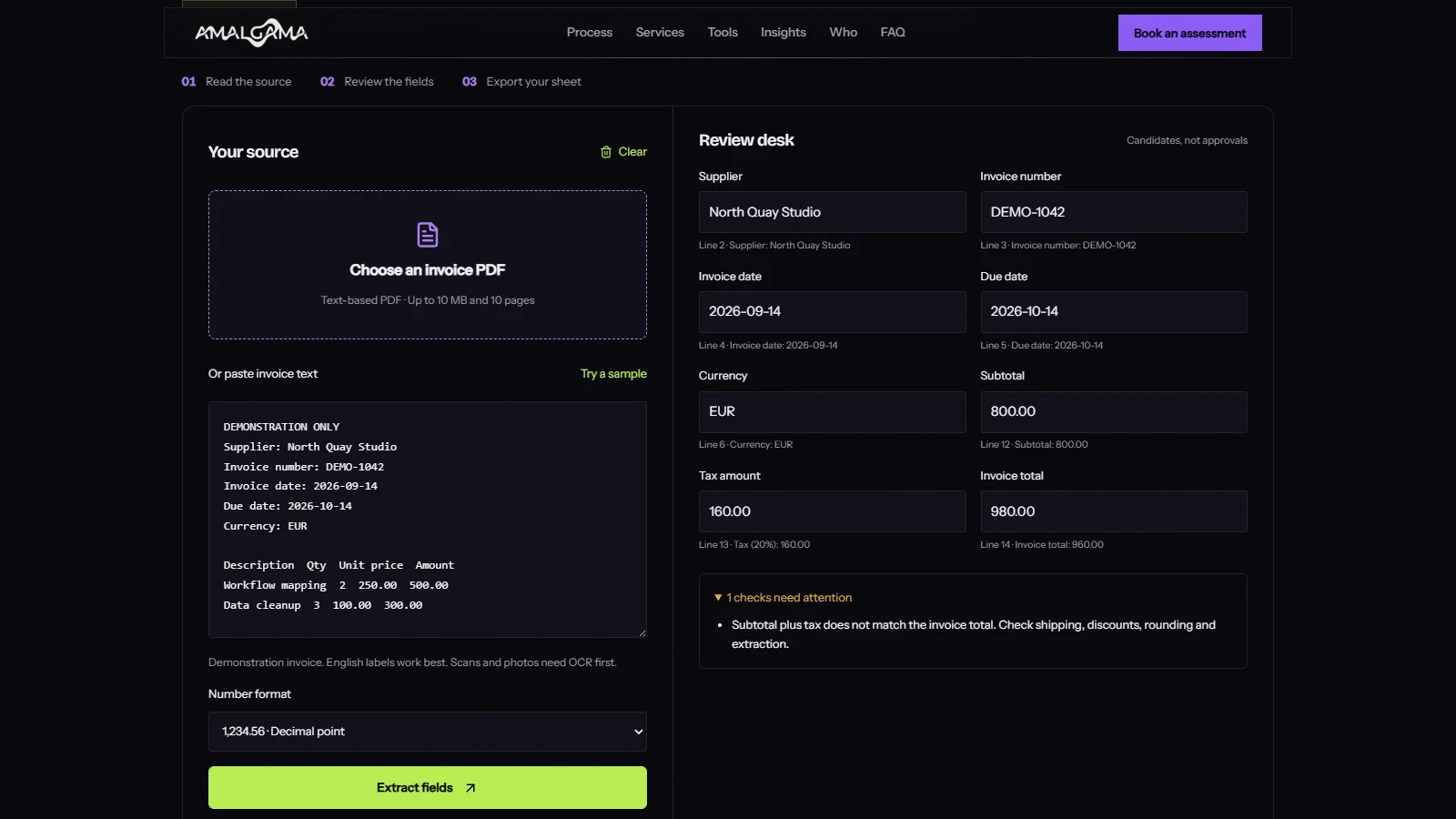
These checks expose inconsistent figures. They do not prove that the invoice is complete or genuine. A duplicated line can still have impeccable arithmetic. A fraudulent invoice can add up beautifully.
Keep invoice total separate from amount due. A partial payment, credit or deposit can make them different. The free tool deliberately does not treat an amount-due label as an invoice-total label. Check shipping, discounts and rounding when the simple subtotal-plus-tax calculation fails. Do not change the source figure merely to make a warning disappear.
Know when you need OCR or an invoice model
Text extraction, OCR and invoice understanding solve different problems. PDF.js can make a PDF's existing text available to an application. OCR recognises characters in an image. An invoice model tries to organise document content into fields and line items.
For example, Microsoft's Document Intelligence invoice model accepts digital PDFs and scanned or photographed documents and returns structured invoice data. That broader capability can be useful when suppliers send inconsistent formats. It still has to fit your data policy and be tested on the documents you receive.
Our local converter covers a narrower task. It reads available PDF text and applies explicit extraction rules. Your invoice file and extracted text stay in the page's memory instead of going to an extraction provider. Clearing the session discards that working data. Your downloaded spreadsheet remains on your device, and normal site analytics follow the site's consent settings.
For a business choosing a hosted service, document handling belongs in the evaluation. Check where files are processed, retention, access controls, contractual terms and what happens to failed requests. A free allowance answers a pricing question. It does not answer those questions.
Build the accounting handoff around exceptions
A production accounts payable workflow needs a record for each incoming invoice, including its source, receipt time and processing state. Use a stable identifier so a retry does not create a second payable item.
Match the supplier against your accounting records. Compare the invoice with the purchase order and receipt information where that process applies. Route changed bank details through your established verification procedure. Extracting an account number from a PDF is not evidence that the account belongs to the supplier.
Duplicate detection also needs more thought than a filename check. A supplier can resend the same invoice with a different attachment name. Compare the supplier, invoice identifier, currency and amount, with a review path for legitimate corrections and credit notes.
Give exceptions an owner. A queue called "needs review" is useful only if someone knows what to do with its contents. The reviewer needs the original document, the extracted value and the reason it was stopped. After a correction, record what changed before passing the invoice to the next stage.
Keep accounting writes and payment actions behind explicit permissions. Test an integration in a sandbox or with a draft state before allowing it to create payable records. Our guide to moving an AI pilot into production covers that wider implementation problem.
Measure accepted invoices rather than extracted pages
Use a representative sample that includes the awkward documents, not only the supplier whose invoices already look like a database export. Include scans if you receive them, credit notes, unfamiliar layouts and documents with missing purchase orders.
Record whether each field is correct, whether a person noticed an error, and how long the complete review took. A model that returns most fields correctly can still fail on the one field your accounting import requires. Track invoice-level acceptance as well as field-level accuracy.
The economic calculation should include preparation, checking, exception handling and maintenance. Suppose, purely as a planning example, a team handles 400 invoices a month and reduces active work from six minutes to two minutes per invoice. That releases about 26.7 hours before implementation and maintenance costs. It does not automatically remove 26.7 paid hours from the payroll.
Put your own volumes and review time into the AI agent ROI calculator. Use measured time once the pilot runs. Avoid treating a vendor's best-case demonstration as your baseline.
Try the failure case first
Open the invoice review tool, load its sample and change the total. Check that you can find the problem, understand the warning and correct it before export. Then try one of your own supported PDFs and compare every field.
If the useful part is the spreadsheet, you have a small tool that saves some copying. If the repetitive work sits between the inbox, approvals and accounting system, you have an integration project. Scope that process with Amalgama through a workflow assessment before committing to the larger build.
Implementation references
The local tool uses Mozilla PDF.js to read PDF text and write-excel-file to write XLSX files. The extraction rules and arithmetic checks are application logic, not a claim of vendor-certified accuracy. The screenshots use fictional demonstration data.